Shelf adds your own sections, sticky notes, and checklists inside Gmail —
and it never gets access to your account. No sign-in, no server, nothing leaves your browser: by architecture, not by promise.
The whole idea in under a minute: one real label going from an unsorted pile to shelves, a checklist note, sub-shelves, and your own order.
Captioned — sound optional.
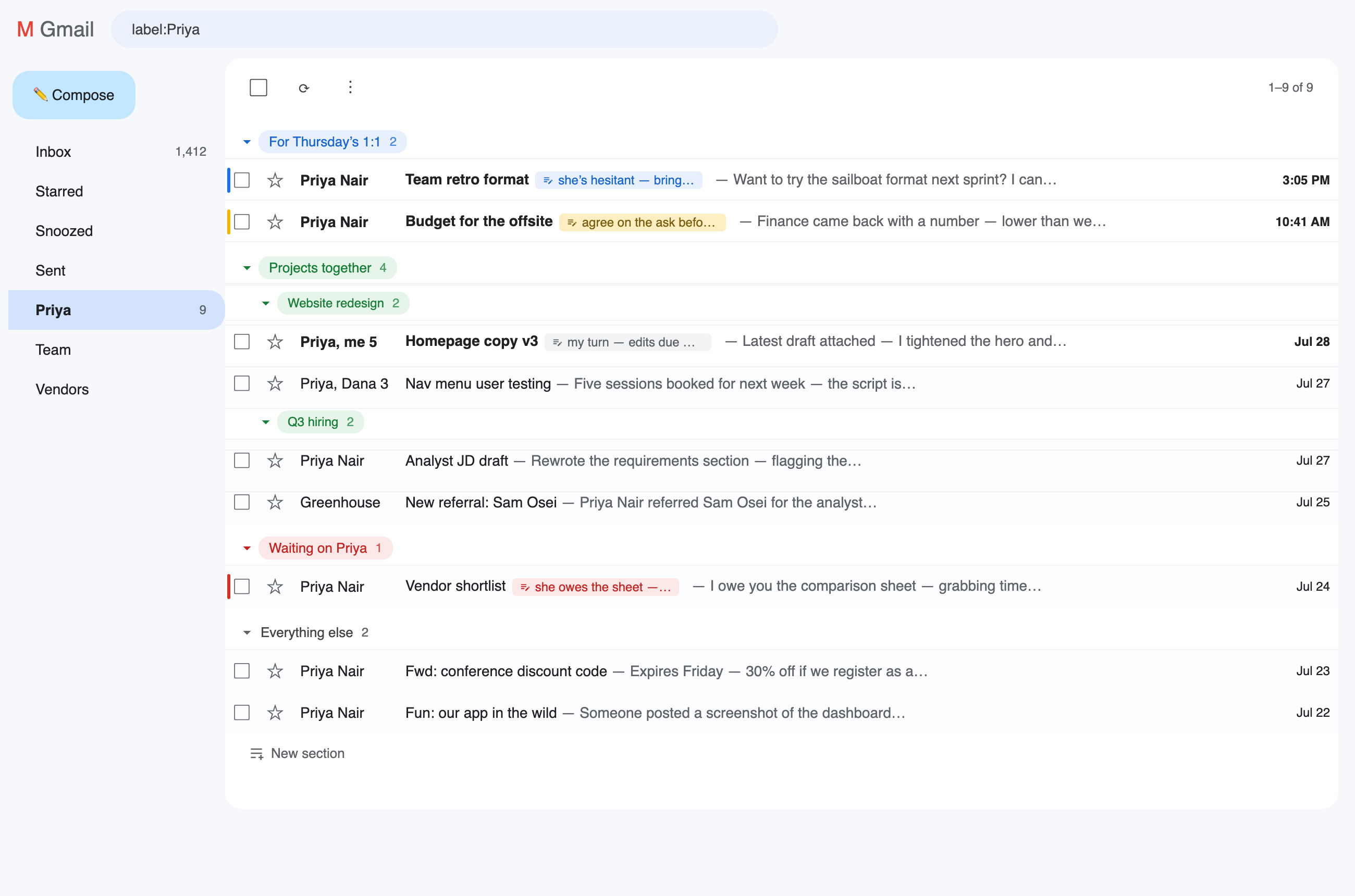
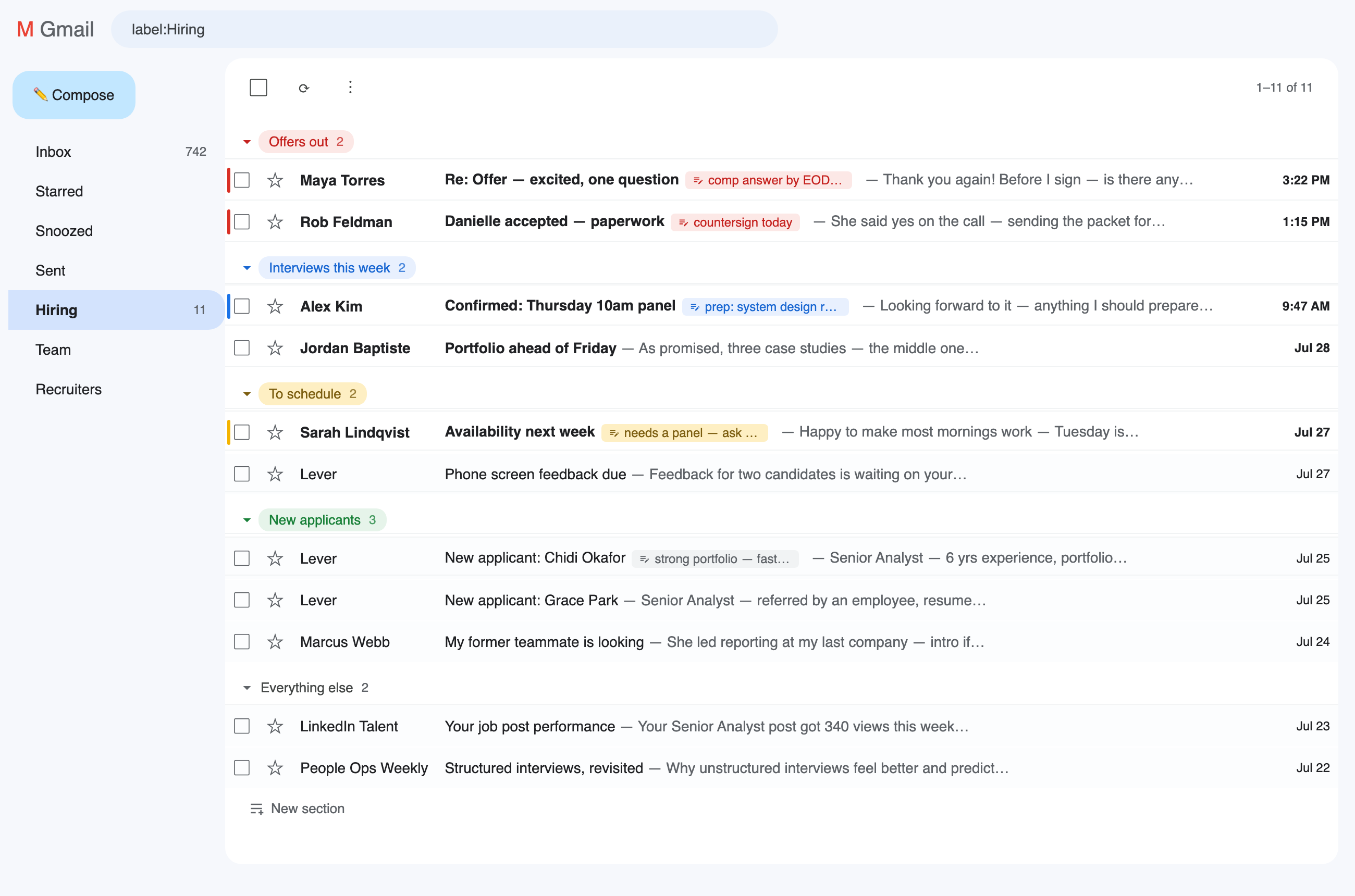
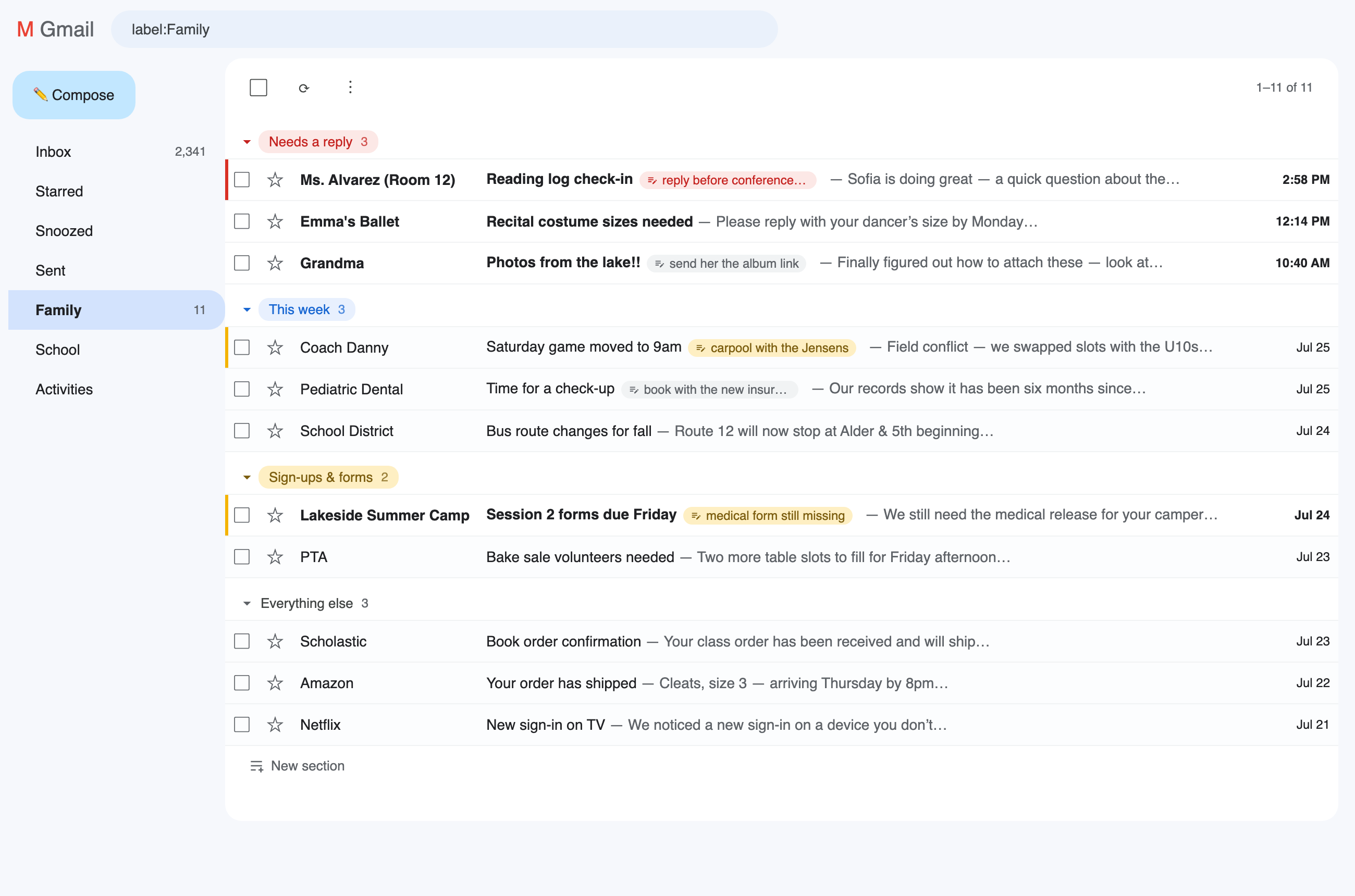
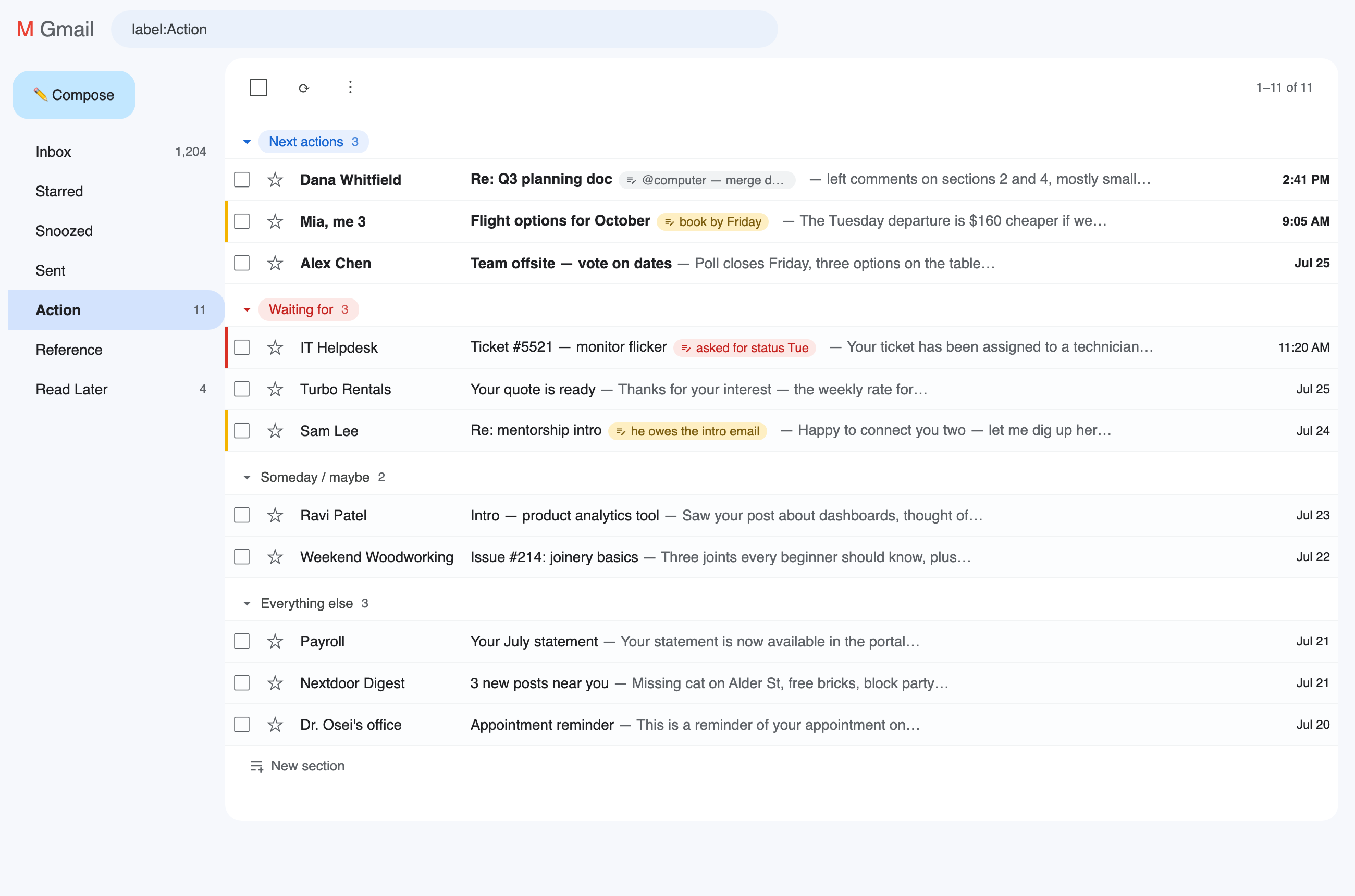
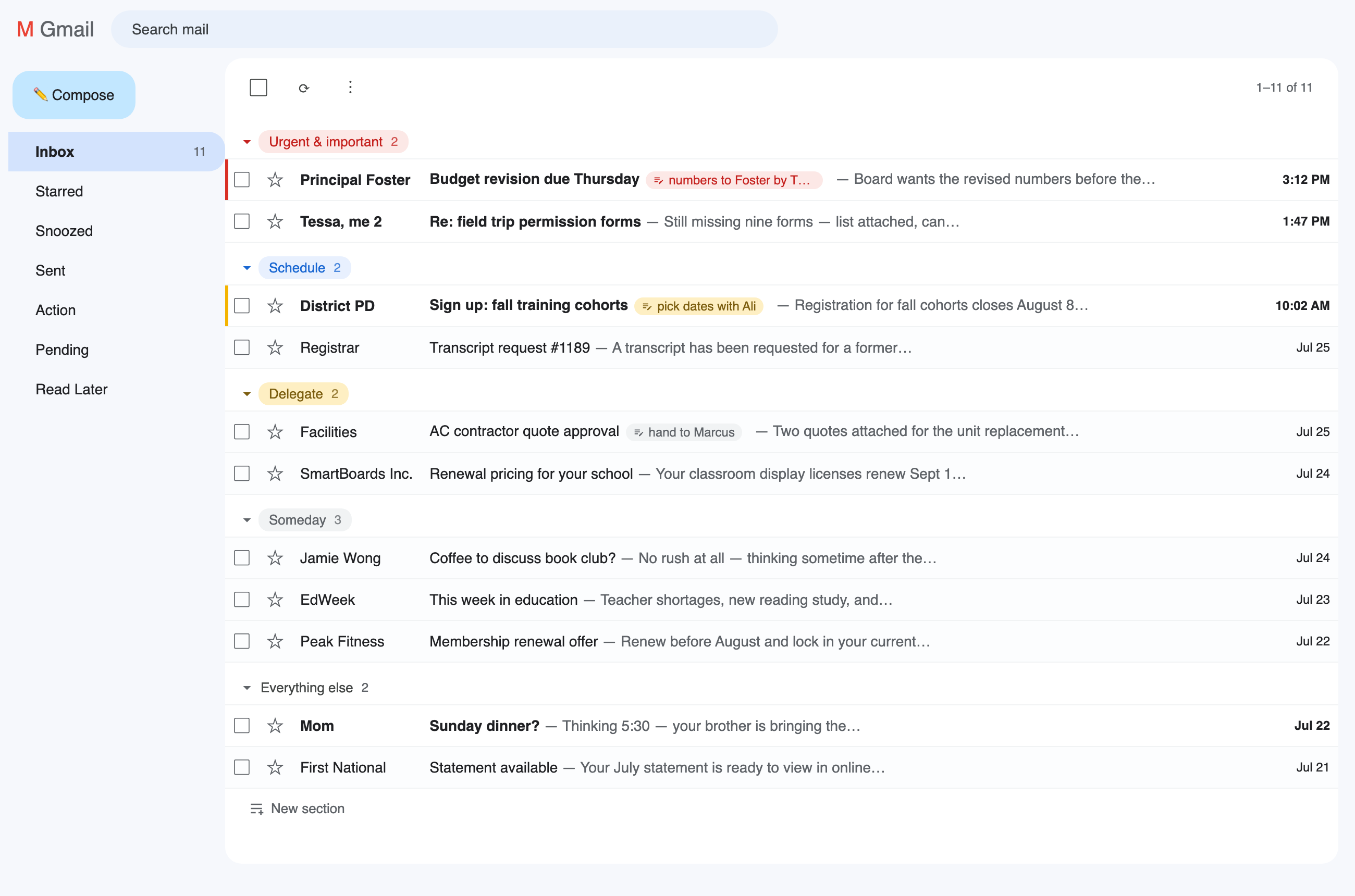
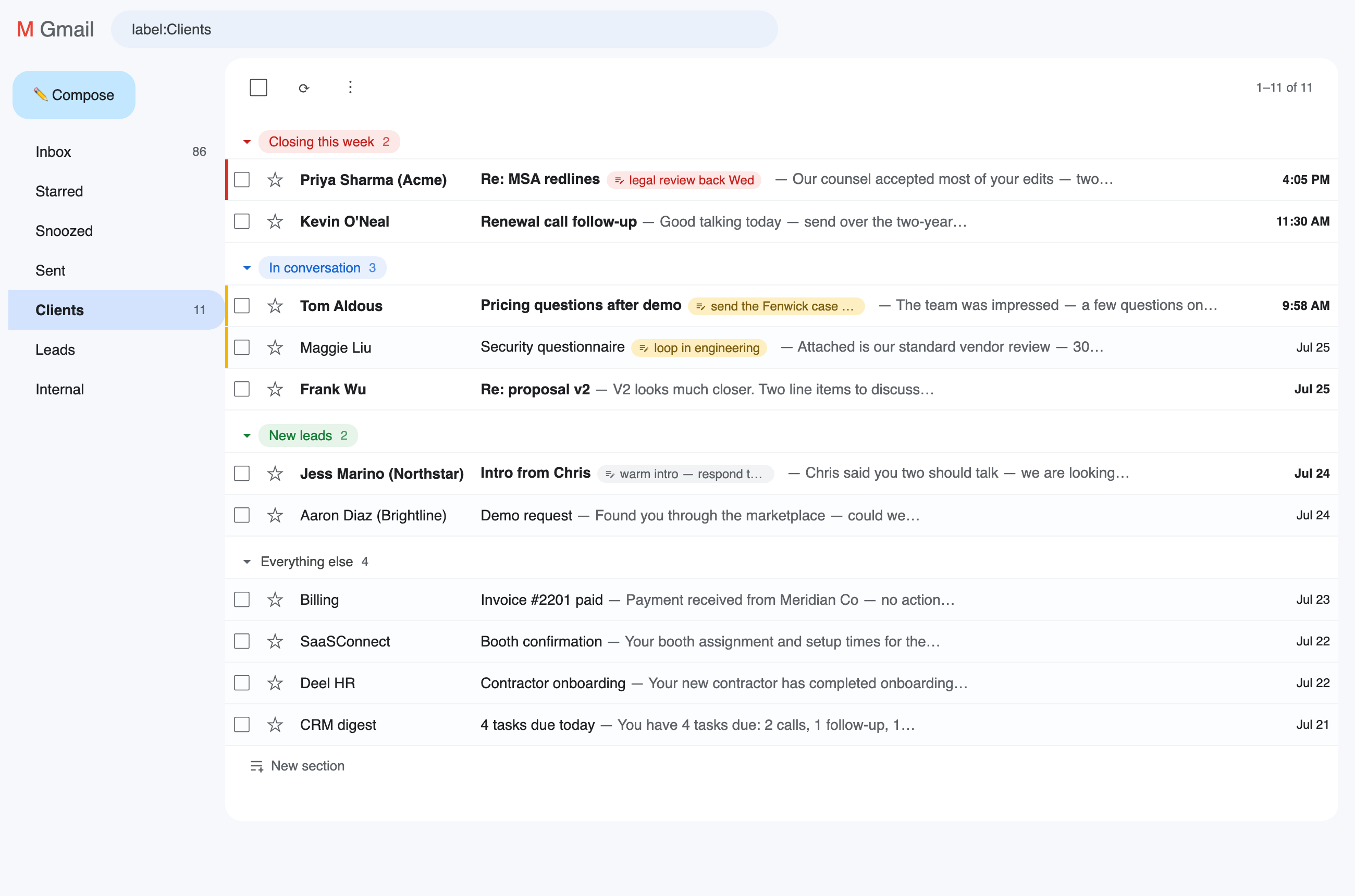
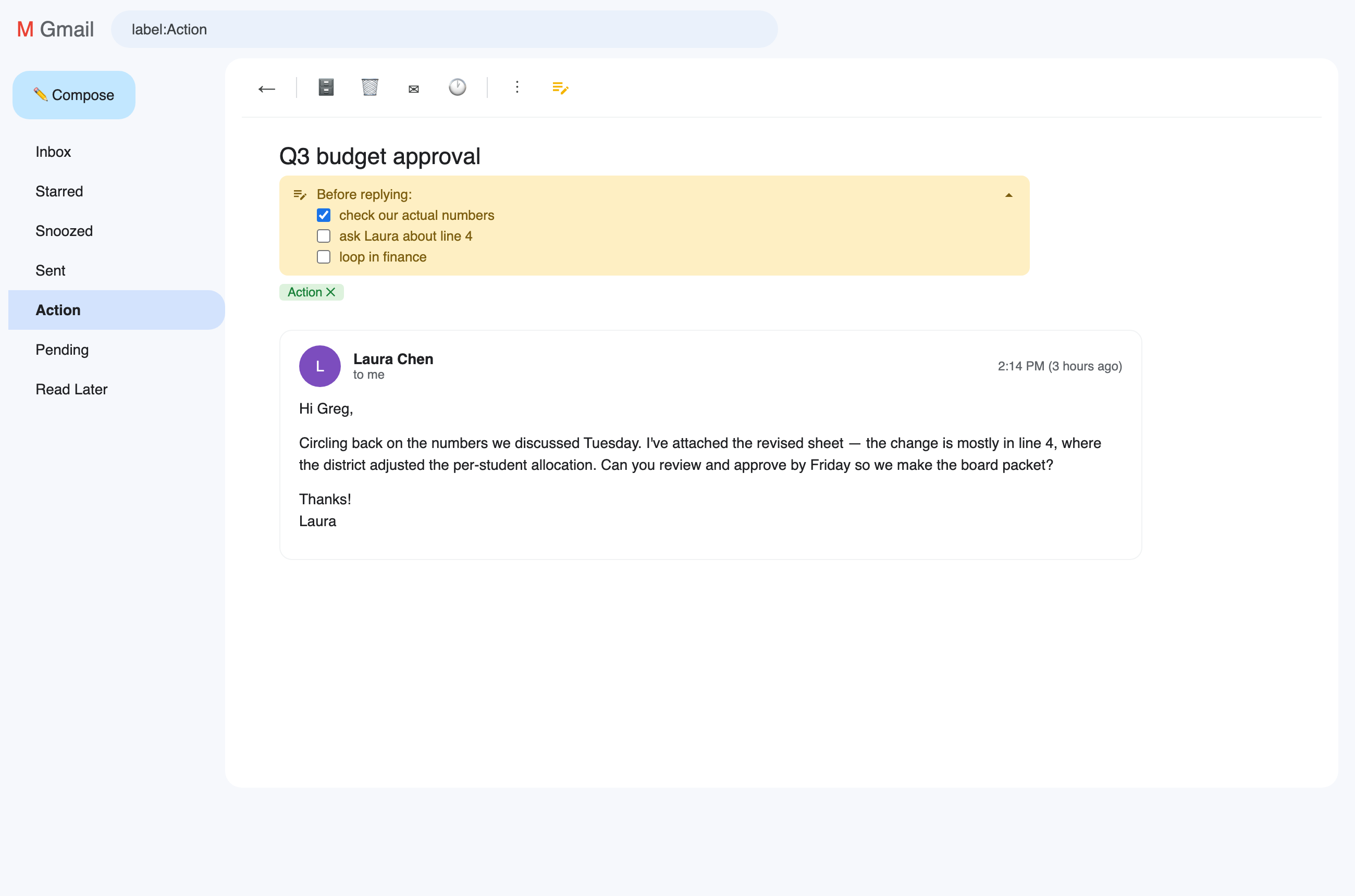
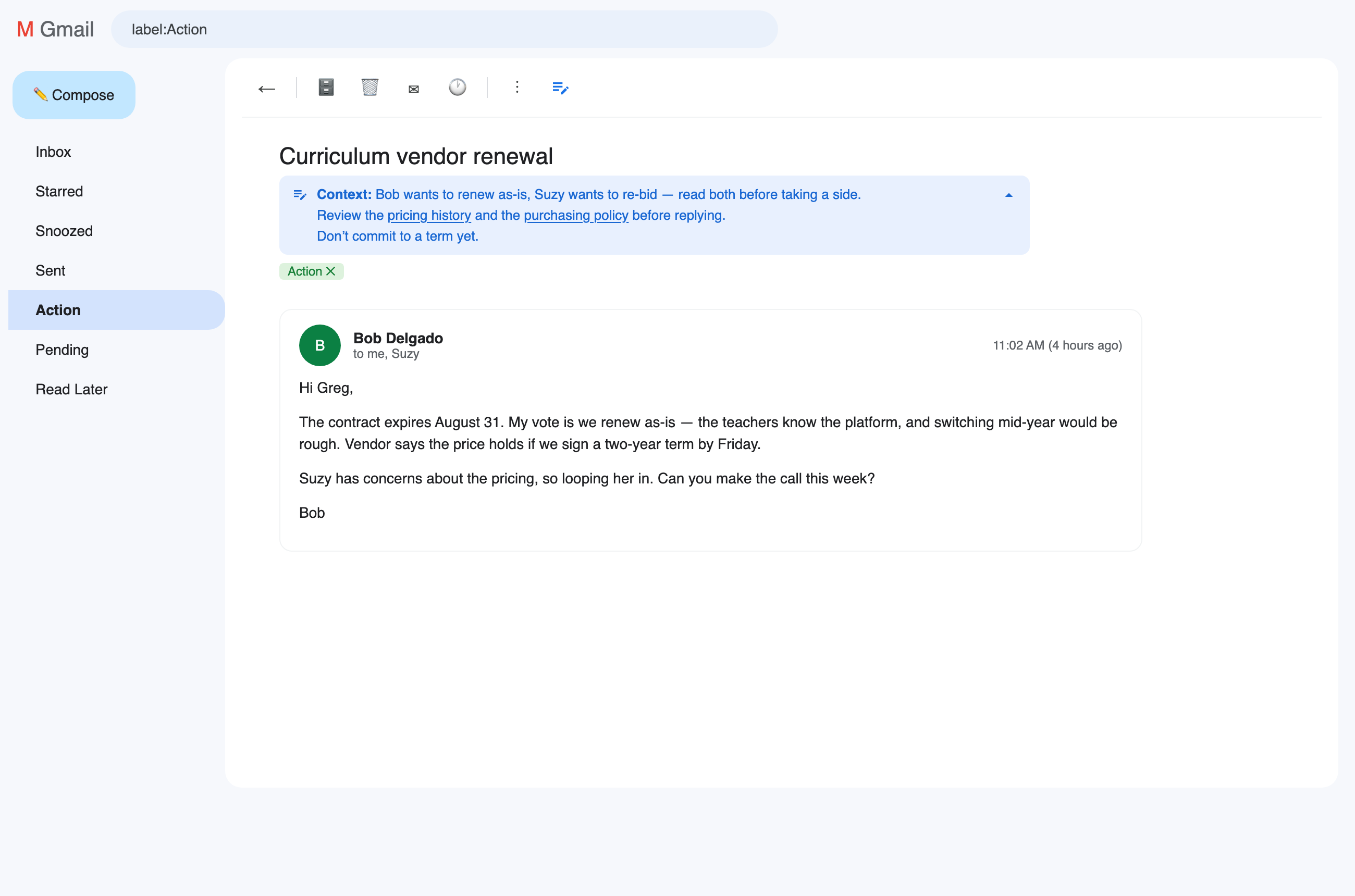
Or explore it yourself: flip through setups people actually run, and the notes that keep each thread's context right where you'll see it. Click the image to step through. And these are just examples — shelves are freeform, so build whatever your life actually needs.
Before & after
Setups
Notes
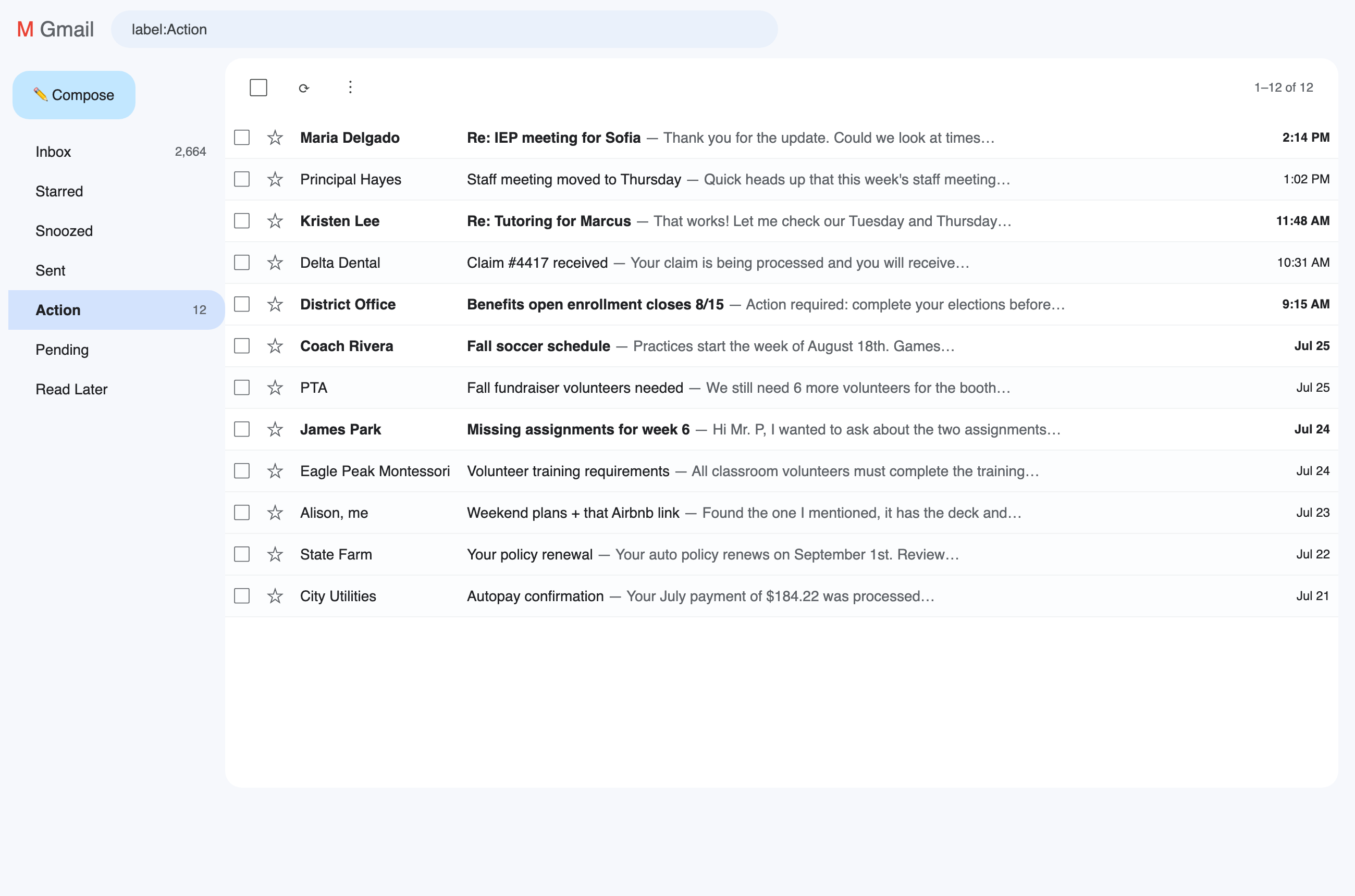
Before: everything in the order it arrived — parents, insurance, deadlines, and noise interleaved.
Labels tell you what an email is. Shelf tells you what to do next.
Everything renders in Gmail's own visual language — same grays, same blues, same motion. If you can tell where Gmail ends and Shelf begins, that's a bug.
Shelves & sub-shelves
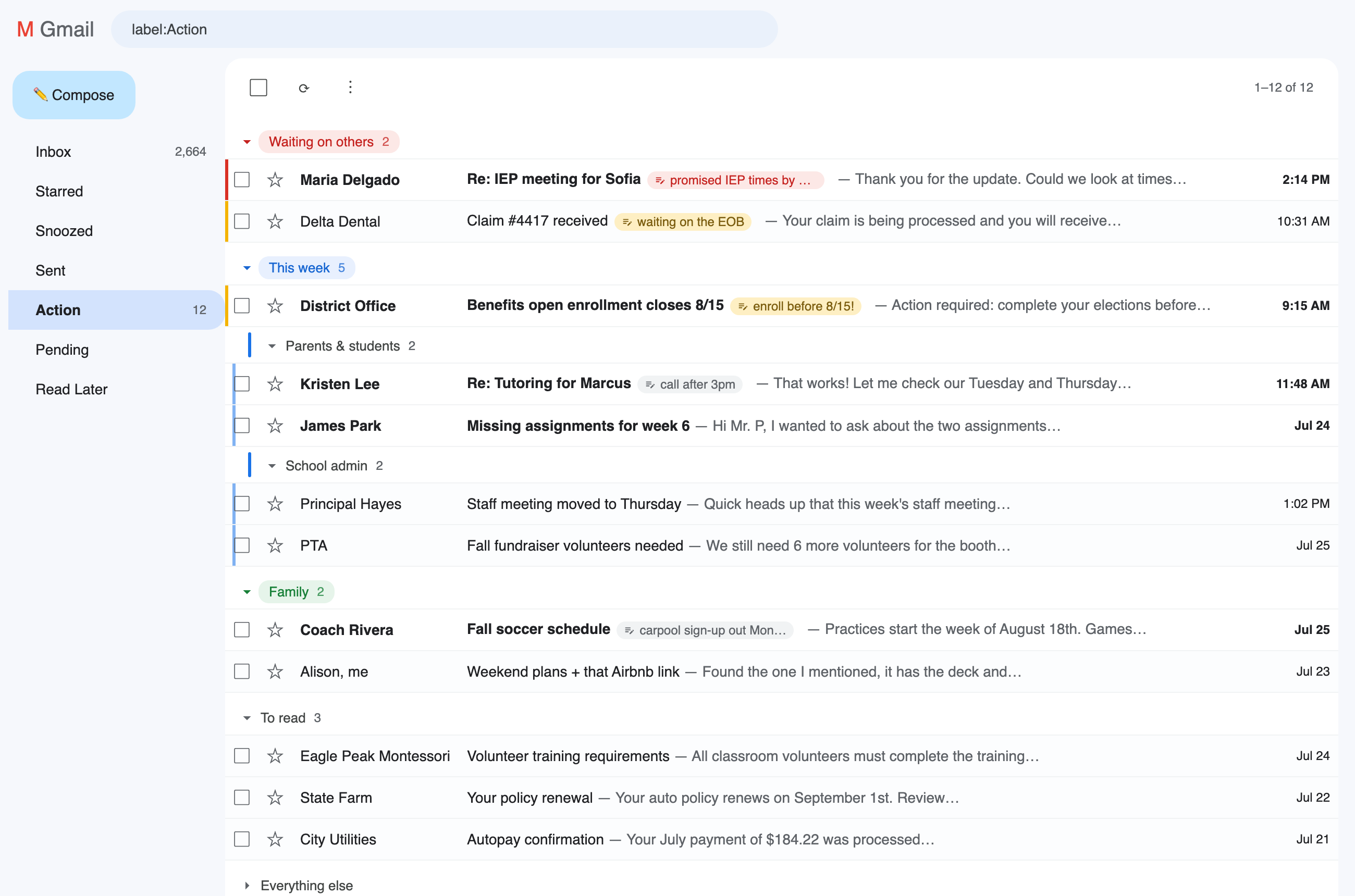
Your own section headers inside the inbox and any label — create one in three seconds, drag threads onto it, collapse what's done. Nest a sub-shelf inside a shelf ("This week" → "Parents & students") and drag it back out whenever.
Your order
Drag threads into the sequence you'll actually work them in — within a shelf, between shelves, and the shelves themselves. Not date order, not Gmail's guesses. Yours.
Notes & checklists
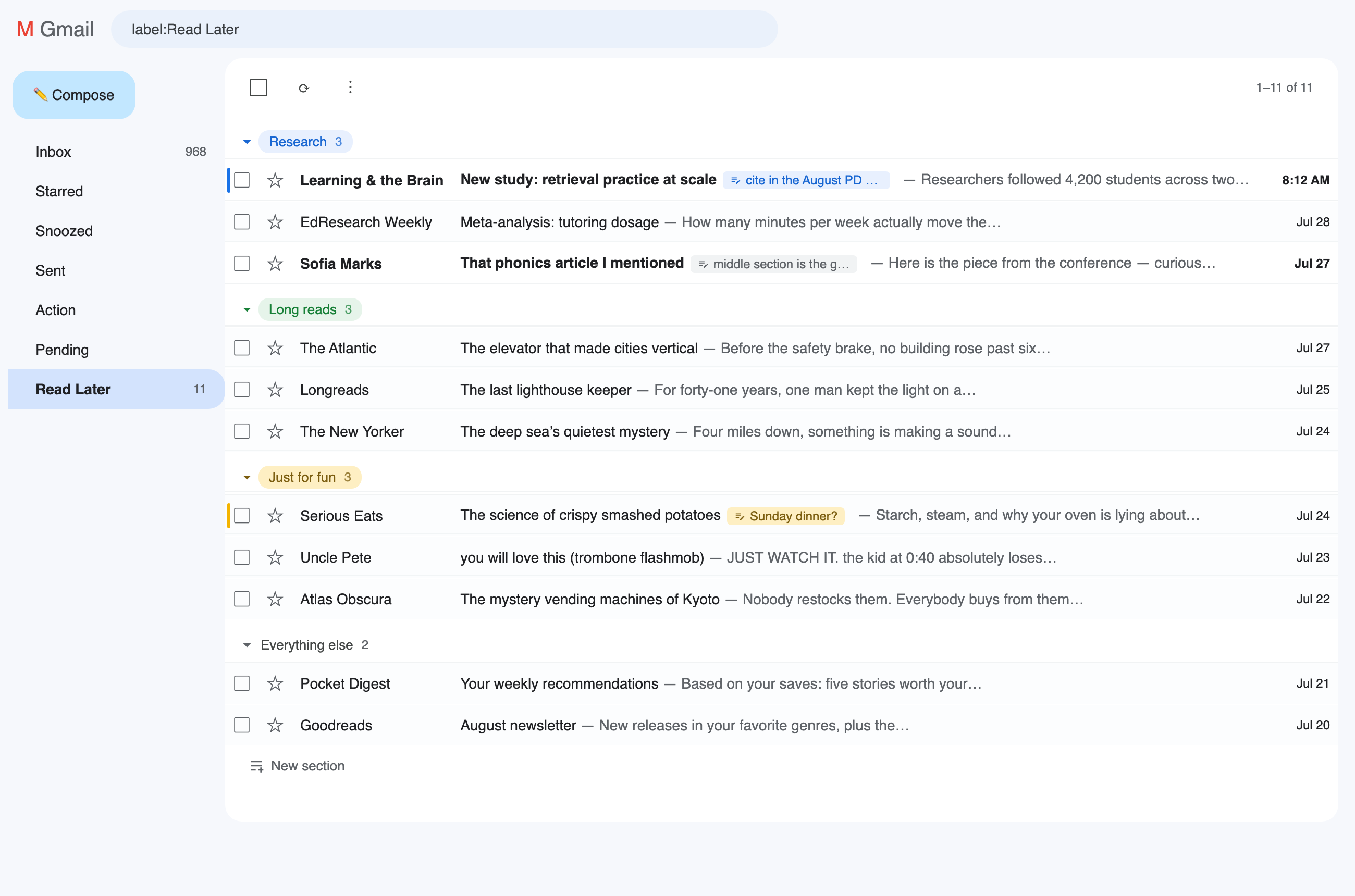
A private sticky on any thread: ✎ promised reply by Friday — visible in the list and on the open conversation. Bold, italic, links (⌘K), bullets, numbers, and checkboxes you can tick right on the note. Long notes collapse.
Colors, quietly
A small Gmail-native palette for shelves and notes — no color picker, on purpose. A colored note paints a slim edge on the row itself, so urgency reads while you scan.
Keyboard-first, if you want
Alt+N notes a thread, Alt+M files it, Alt+↑/↓ reorders it — always the thread you just addressed, whether that's Gmail's cursor row or the one under your mouse. Alt+S hides Shelf for a peek at plain Gmail, and brings it back. ⌘B/I/U, ⌘⇧8/7/9 for lists and checklists — the same muscle memory as Docs.
Works where you work
Dark mode and custom themes detected automatically. Reading-pane layouts supported. Multiple Google accounts kept separate. Everything exportable as JSON.
What makes it different
Multiple inboxes — anywhere, without the setup. Gmail's own Multiple Inboxes can section things too — if you write search operators in Settings, live within its five-section cap, and give up the reading pane. And it still only splits the inbox. Shelf sections are drag-and-drop, unlimited, and work in every label: your Action label, your Clients label, each with its own shelves.
Your order, not the algorithm's. Email tools sort by date, sender, or "importance." Shelf is the only ordering that matters: the one you chose.
The note lives on the email. No separate app to check. What you're waiting on is written on the thread itself, wherever you see it.
It never gets access to your account. No OAuth grant, no Gmail API, no server — nothing leaves your browser. That's architecture, not a privacy promise.
What Shelf can't do — by design
No Gmail account access: no OAuth grant, no Gmail API, no server anywhere
Cannot send, archive, delete, or label your email — it only sees the page you're already looking at, and transmits nothing
Your sections and notes live in your browser's own extension storage and never leave it
No analytics, no tracking, no account
Uninstall it and Gmail is exactly as it was
Why this exists — and why it's free
I built Shelf for myself. I've run the whole productivity canon — GTD, inbox zero,
a dozen apps that promise to turn email into tasks. They all failed the same way: every
time I moved something out of Gmail, the system added more friction than it removed —
one more place to check, one more list to keep honest. The truth I kept landing on:
I live in Gmail, and moving things out of it is often more friction than it's
worth. Email is where the work actually shows up, so the organizing had to happen
inside it.
I'm also picky about how software feels. Every Gmail organizer I tried felt bolted
on — foreign colors, clunky popups, a beat of lag on every action. I wanted
something that looked and moved like Gmail itself, as if Google had shipped it.
So Shelf is the tool I wished existed: my sections, my order, my notes, natively
inside Gmail. It's free because this isn't a business — it's a thing I made to solve
my own problem. Friends borrowed it and told me it stuck, which is the only reason
it's public. And here's the deal I'd love to make with you: Shelf is free for
individuals — always. Use it for a few weeks first — then, if it's earned a place in your day, visit the
Ko-fi and
donate whatever the value you got is worth to you. Every donation genuinely means a
lot. A quick store review helps in a
different way: it's how other people find Shelf.
— Greg, an educator who gets a lot of email
What people use it for
Waiting-on tracking — the follow-ups that slip: one shelf, one red note each
Inbox-zero triage — drag "Everything else" to the top: new mail first, shelves below
Job hunts — Applied / Interviewing / Offer, without exporting your life to a kanban app
Big projects — house purchase, renovation, wedding: a shelf per vendor
Family & school admin — a shelf per kid, per school, per season
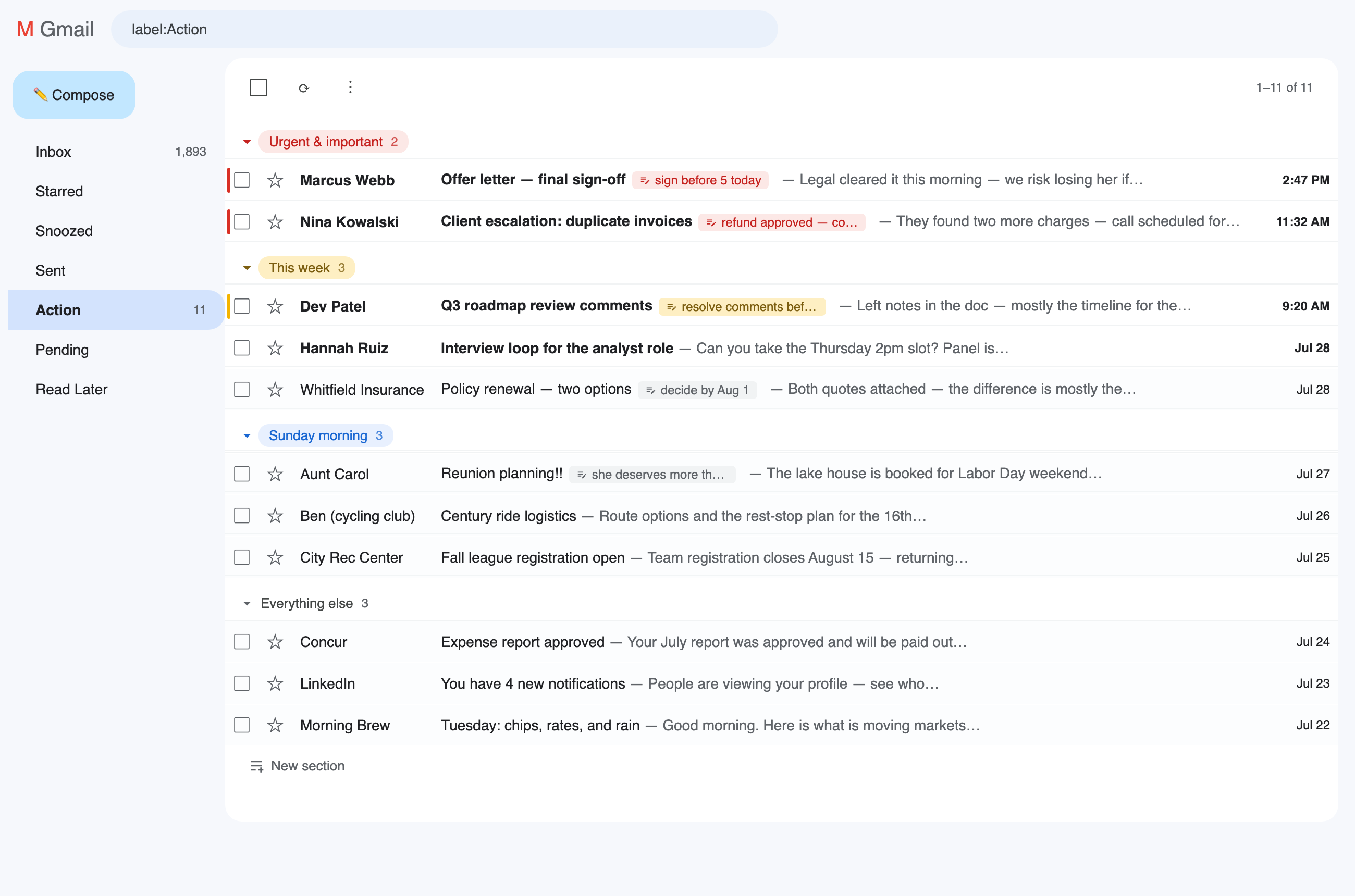
Client work — every client gets a shelf inside your Action label
Teachers & school staff — triage parent and student email, with notes carrying the context
Prioritizing — Urgent & Important / Schedule / Delegate / Someday, right inside the inbox
Questions
Is it really free?
Yes — Shelf is free for individuals, always: no trial, no locked features, no upsell, and you personally will never pay. It runs on generosity instead: there's a Ko-fi, and if Shelf earns a place in your day, give what that's worth to you. Every donation genuinely means a lot — it's what tells me to keep going. That, plus store reviews, is the entire business model.
Which browsers does it work in?
Chrome is home, and I test every release there. Because Shelf is a standard extension with no exotic tricks, it also runs on Chromium-based browsers — Edge, Brave, Arc, Vivaldi, Opera — from the same Chrome Web Store install. Firefox and Safari use a different extension system, so they aren't supported today — but I'll build those versions if the demand is there. If you want one, say so.
Does it work with the reading pane (split view)?
Yes — vertical and horizontal splits both. Shelf detects the reading pane and stays out of Gmail's way there, so conversations open in the pane like they should.
How can it work without reading my email?
Shelf is a page overlay. It draws sections and notes on top of Gmail's own thread list in your browser tab, and remembers your organization by Gmail's thread numbers — never content. There's no server to send anything to.
Does it sync between my computers?
Yes — via Chrome's own extension sync on your Google profile, the same mechanism that syncs your bookmarks. Shelf has no cloud of its own. Notes don't appear on phones; that's the tradeoff for zero email permissions.
What happens if Gmail changes its design?
Shelf fails safe: your email is untouched (it always is), and a small banner tells you an update is needed instead of the extension silently vanishing. Your data stays put and can be exported as JSON any time.
Will it stay updated?
Yes. I use Shelf every day and I'm almost certainly its biggest power user — so when Gmail shifts or something breaks, I feel it before you do and fix it for my own inbox first. Shelf stays maintained for as long as I'm relying on it, which is to say until Google builds this natively into Gmail. If that day ever comes, wonderful — that was the whole point.
Is it accessible?
Yes: full keyboard support with visible focus, screen-reader labels on every control, reduced-motion support, and it's colorblind-friendly by design — color never carries meaning alone; chips have words and shelves have names.
What happens when I uninstall?
Gmail looks exactly like it did before Shelf. Your sections and notes are deleted with the extension — export a JSON backup first if you want to keep them.